
During my time at Royal Publishing, I have developed a stronger command of Photoshop, InDesign, Excel, and other software while expanding my scripting and automation skills. I made it a personal mission to make my job as efficient as possible by automating repetitive tasks and streamlining established workflows.
This led me to develop numerous JavaScript scripts for InDesign that automate tasks such as formatting rosters, adjusting column layouts, standardizing cutlines and titles, converting four-color logos into two-color versions for easier printing, and clearing book contents for reuse in a new season. Tasks such as formatting 5–30 rosters to a consistent standard in under 30 minutes would be considerably more time-consuming without these tools. I also developed Excel macros to streamline data processing, a significant component of my work.
Many of these scripts and macros have fundamentally changed how I approach my workload, reducing manual effort, improving consistency, and allowing me to complete tasks far more efficiently. Through these projects, I have combined my knowledge of publishing software with practical programming skills to solve real production challenges and improve day-to-day workflows.
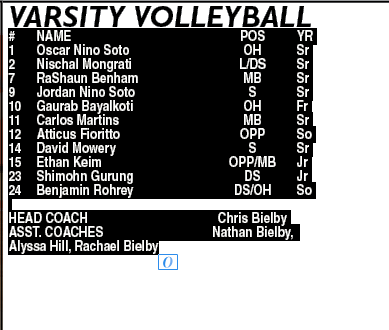
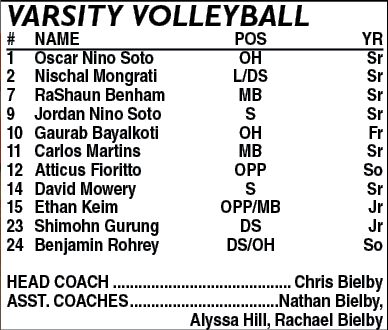
This script formatted rosters in one click. We wanted the text to be as big as possible whole not exceeding 9pt font.
Here is the order of operations as to what this script does:
Applies a paragraph style to the entire selection.
Applies an underline paragraph style to the first line of the selection.
Applies a leader line to everything that includes the word "coach."
Increases the font size while not exceeding 9pt font.
Justifies text.
Here is the order of operations as to what this script does:
Applies a paragraph style to the entire selection.
Applies an underline paragraph style to the first line of the selection.
Applies a leader line to everything that includes the word "coach."
Increases the font size while not exceeding 9pt font.
Justifies text.

#target "InDesign"
(function () {
if (app.documents.length === 0) {
alert("No document open.");
return;
}
alert("No document open.");
return;
}
var doc = app.activeDocument;
// ==================================================
// CONFIG
// ==================================================
// CONFIG
// ==================================================
var BODY_STYLE = "BODY";
var TOP_STYLE = "TOP UNDERLINE";
var BOTTOM_STYLE = "BOTTOM COACHES PERIODS";
var TOP_STYLE = "TOP UNDERLINE";
var BOTTOM_STYLE = "BOTTOM COACHES PERIODS";
var TWO_BODY = "2 collumn body";
var TWO_FIRST = "2 collumn header";
var TWO_FIRST = "2 collumn header";
var KEYWORD = "coach";
var MAX_SIZE = 9, MIN_SIZE = 7, SIZE_STEP = 0.25;
// ==================================================
// GET TARGET
// ==================================================
if (app.selection.length === 0) {
alert("Select text or a text frame.");
return;
}
alert("Select text or a text frame.");
return;
}
var target, story, tf;
if (app.selection[0].hasOwnProperty("baseline")) {
target = app.selection[0];
story = target.parentStory;
tf = story.textContainers[0];
}
else if (app.selection[0] instanceof TextFrame) {
tf = app.selection[0];
story = tf.parentStory;
target = story;
}
else {
alert("Select text or frame.");
return;
}
target = app.selection[0];
story = target.parentStory;
tf = story.textContainers[0];
}
else if (app.selection[0] instanceof TextFrame) {
tf = app.selection[0];
story = tf.parentStory;
target = story;
}
else {
alert("Select text or frame.");
return;
}
// ==================================================
// MAIN FLOW
// ==================================================
applyStyles(target, false);
justify(tf);
justify(tf);
// 1️⃣ ONE COLUMN → shrink only
shrinkToFit(target, tf);
shrinkToFit(target, tf);
// 2️⃣ FALLBACK → 2 columns ONLY (no scaling/shrinking)
if (tf.overflows) {
if (tf.overflows) {
tf.textFramePreferences.textColumnCount = 2;
var prefs = tf.textFramePreferences;
if ("balanceColumns" in prefs)
prefs.balanceColumns = true;
else if ("verticalBalanceColumns" in prefs)
prefs.verticalBalanceColumns = true;
prefs.balanceColumns = true;
else if ("verticalBalanceColumns" in prefs)
prefs.verticalBalanceColumns = true;
story.recompose();
applyStyles(target, true);
story.recompose();
}
story.recompose();
}
alert("Done ✔");
// ==================================================
// FUNCTIONS
// ==================================================
function justify(frame) {
frame.textFramePreferences.verticalJustification =
VerticalJustification.JUSTIFY_ALIGN;
}
frame.textFramePreferences.verticalJustification =
VerticalJustification.JUSTIFY_ALIGN;
}
// ---------- FONT SHRINK (ONLY 1-column phase)
function shrinkToFit(range, frame) {
var start = Math.min(range.characters[0].pointSize, MAX_SIZE);
var finalSize = start;
var finalSize = start;
for (var s = start; s >= MIN_SIZE; s -= SIZE_STEP) {
range.characters.everyItem().pointSize = s;
range.characters.everyItem().leading = s;
range.characters.everyItem().leading = s;
story.recompose();
if (!frame.overflows) {
finalSize = s;
break;
}
}
finalSize = s;
break;
}
}
normalizeText(range, finalSize);
}
}
// ---------- normalize size/leading only
function normalizeText(range, size) {
var chars = range.characters.everyItem();
chars.pointSize = size;
chars.leading = size;
chars.leading = size;
story.recompose();
}
}
// ---------- APPLY STYLES
function applyStyles(range, twoCol) {
var body = findStyle(twoCol ? TWO_BODY : BODY_STYLE);
var first = findStyle(twoCol ? TWO_FIRST : TOP_STYLE);
var bottom = findStyle(BOTTOM_STYLE);
var first = findStyle(twoCol ? TWO_FIRST : TOP_STYLE);
var bottom = findStyle(BOTTOM_STYLE);
var paras = range.paragraphs;
for (var i = 0; i < paras.length; i++)
paras[i].appliedParagraphStyle = body;
paras[i].appliedParagraphStyle = body;
if (paras.length > 0)
paras[0].appliedParagraphStyle = first;
paras[0].appliedParagraphStyle = first;
if (!twoCol && bottom) {
for (var p = 0; p < paras.length; p++) {
if (paras[p].contents.toLowerCase().indexOf(KEYWORD) !== -1)
paras[p].appliedParagraphStyle = bottom;
}
}
}
for (var p = 0; p < paras.length; p++) {
if (paras[p].contents.toLowerCase().indexOf(KEYWORD) !== -1)
paras[p].appliedParagraphStyle = bottom;
}
}
}
// ---------- style finder
function findStyle(name, container) {
container = container || doc;
var styles = container.paragraphStyles;
for (var i = 0; i < styles.length; i++)
if (styles[i].name === name) return styles[i];
if (styles[i].name === name) return styles[i];
var groups = container.paragraphStyleGroups;
for (var g = 0; g < groups.length; g++) {
var found = findStyle(name, groups[g]);
if (found) return found;
}
var found = findStyle(name, groups[g]);
if (found) return found;
}
return null;
}
}
})();
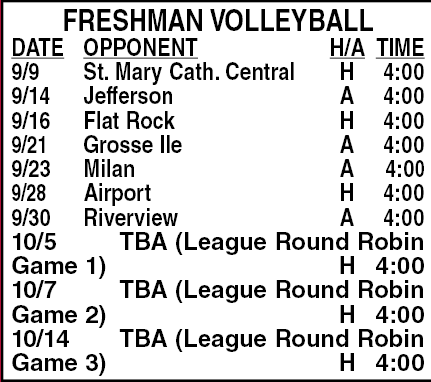
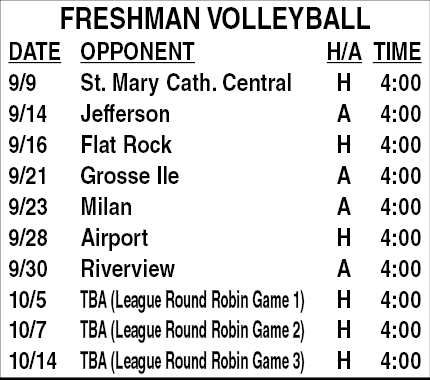
This script justifies the second column in the selected text so that it doesn't push the characters to the second line.
#target "InDesign"
(function () {
if (!app.documents.length) {
alert("No document open.");
return;
}
alert("No document open.");
return;
}
if (!app.selection.length || !(app.selection[0] instanceof Text)) {
alert("Select the schedule text first.");
return;
}
alert("Select the schedule text first.");
return;
}
var paras = app.selection[0].paragraphs.everyItem().getElements();
var MAX_SCALE = 85;
var MIN_SCALE = 55;
var EXTRA_REDUCTION = 10;
var PRECISION = 0.5;
var MIN_SCALE = 55;
var EXTRA_REDUCTION = 10;
var PRECISION = 0.5;
for (var p = 0; p < paras.length; p++) {
var para = paras[p];
if (para.contents.replace(/\s/g, "") === "") continue;
var chars = para.characters;
var tabIndexes = [];
var tabIndexes = [];
for (var c = 0; c < chars.length; c++) {
if (chars[c].contents === "\t") {
tabIndexes.push(c);
}
}
if (chars[c].contents === "\t") {
tabIndexes.push(c);
}
}
if (tabIndexes.length < 2) continue;
var startIndex = tabIndexes[0] + 1;
var endIndex = tabIndexes[1] - 1;
if (endIndex < startIndex) continue;
var endIndex = tabIndexes[1] - 1;
if (endIndex < startIndex) continue;
var opponentRange = chars.itemByRange(startIndex, endIndex);
// Reset opponent column to max
opponentRange.horizontalScale = MAX_SCALE;
opponentRange.horizontalScale = MAX_SCALE;
// If it already fits, skip completely
if (para.lines.length <= 1) {
continue;
}
if (para.lines.length <= 1) {
continue;
}
// ---- It wraps → perform binary shrink ----
var low = MIN_SCALE;
var high = MAX_SCALE;
var mid;
var low = MIN_SCALE;
var high = MAX_SCALE;
var mid;
while ((high - low) > PRECISION) {
mid = (low + high) / 2;
opponentRange.horizontalScale = mid;
opponentRange.horizontalScale = mid;
para = paras[p];
if (para.lines.length > 1) {
high = mid;
} else {
low = mid;
}
}
high = mid;
} else {
low = mid;
}
}
// Apply best fit
opponentRange.horizontalScale = low;
opponentRange.horizontalScale = low;
// Apply -10 ONLY because this row required shrinking
var finalScale = low - EXTRA_REDUCTION;
if (finalScale < MIN_SCALE) {
finalScale = MIN_SCALE;
}
var finalScale = low - EXTRA_REDUCTION;
if (finalScale < MIN_SCALE) {
finalScale = MIN_SCALE;
}
opponentRange.horizontalScale = finalScale;
}
}
})();
This script soft returns after every "," "." or ":" in order to have people's names not cut off. Works exactly like the first one where you select the text.


#target "InDesign"
(function () {
if (!app.documents.length) {
alert("No document open.");
return;
}
alert("No document open.");
return;
}
if (!app.selection.length || !app.selection[0].hasOwnProperty("lines")) {
alert("Select a text frame or some text.");
return;
}
alert("Select a text frame or some text.");
return;
}
var sel = app.selection[0];
var lines = sel.lines;
var fullText = sel.contents;
var lines = sel.lines;
var fullText = sel.contents;
// Find the index of the very last period in the selection
var lastPeriodOverall = fullText.lastIndexOf(".");
var lastPeriodOverall = fullText.lastIndexOf(".");
// Step 1: Insert soft returns
for (var i = 0; i < lines.length; i++) {
var line = lines[i];
var contents = line.contents;
for (var i = 0; i < lines.length; i++) {
var line = lines[i];
var contents = line.contents;
var lastComma = contents.lastIndexOf(",");
var lastPeriod = contents.lastIndexOf(".");
var lastPeriod = contents.lastIndexOf(".");
// Skip the very last period
if (lastPeriod === lastPeriodOverall - line.insertionPoints[0].index) {
lastPeriod = -1;
}
if (lastPeriod === lastPeriodOverall - line.insertionPoints[0].index) {
lastPeriod = -1;
}
var insertIndex = Math.max(lastComma, lastPeriod);
if (insertIndex !== -1) {
try {
line.insertionPoints[insertIndex + 1].contents = SpecialCharacters.FORCED_LINE_BREAK;
} catch (e) {}
}
}
try {
line.insertionPoints[insertIndex + 1].contents = SpecialCharacters.FORCED_LINE_BREAK;
} catch (e) {}
}
}
// Refresh selection lines after insertion
lines = sel.lines;
lines = sel.lines;
// Step 2: Remove leading spaces
for (var i = 0; i < lines.length; i++) {
var line = lines[i];
var chars = line.characters;
var removeCount = 0;
for (var i = 0; i < lines.length; i++) {
var line = lines[i];
var chars = line.characters;
var removeCount = 0;
// Count leading spaces
for (var j = 0; j < chars.length; j++) {
if (chars[j].contents === " ") {
removeCount++;
} else {
break;
}
}
for (var j = 0; j < chars.length; j++) {
if (chars[j].contents === " ") {
removeCount++;
} else {
break;
}
}
// Remove them if any
if (removeCount > 0) {
line.characters.itemByRange(0, removeCount - 1).remove();
}
}
if (removeCount > 0) {
line.characters.itemByRange(0, removeCount - 1).remove();
}
}
})();